Social Media Image Sizes & Dimensions Dataset
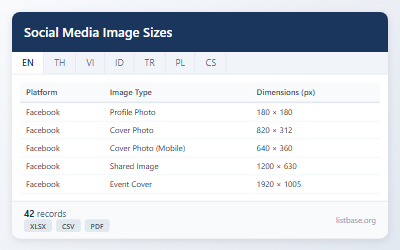
This dataset provides a comprehensive list of 42 social media image sizes, dimensions, and aspect ratios across various platforms. Get up-to-date specifications for profile photos, cover images, and shared posts.
Free Download
Key Takeaways
- Access current image size specifications for major social media platforms.
- Explore dimensions (width, height), aspect ratios, and notes for 42 image types.
- Download ready-to-use data for designing effective social media visuals.
- Get essential guidelines for optimizing your social media content.
Showing 42 of 42
| Platform | Image Type | Dimensions (px) | Width | Height | Aspect Ratio | Notes |
|---|---|---|---|---|---|---|
| Profile Photo | 180 × 180 | 180 | 180 | 1:1 | Displays at 170x170 on desktop | |
| Cover Photo | 820 × 312 | 820 | 312 | 2.63:1 | Desktop display size | |
| Cover Photo (Mobile) | 640 × 360 | 640 | 360 | 16:9 | Mobile display | |
| Shared Image | 1200 × 630 | 1200 | 630 | 1.91:1 | Feed post image | |
| Event Cover | 1920 × 1005 | 1920 | 1005 | 1.91:1 | Event page header | |
| Stories | 1080 × 1920 | 1080 | 1920 | 9:16 | Full screen vertical | |
| Profile Photo | 320 × 320 | 320 | 320 | 1:1 | Circular crop | |
| Square Post | 1080 × 1080 | 1080 | 1080 | 1:1 | Standard feed post | |
| Portrait Post | 1080 × 1350 | 1080 | 1350 | 4:5 | Vertical feed post | |
| Landscape Post | 1080 × 566 | 1080 | 566 | 1.91:1 | Horizontal feed post | |
| Stories/Reels | 1080 × 1920 | 1080 | 1920 | 9:16 | Full screen vertical | |
| Carousel | 1080 × 1080 | 1080 | 1080 | 1:1 | Multi-image post | |
| Twitter/X | Profile Photo | 400 × 400 | 400 | 400 | 1:1 | Displays at 200x200 |
| Twitter/X | Header Image | 1500 × 500 | 1500 | 500 | 3:1 | Banner image |
| Twitter/X | In-Stream Photo | 1200 × 675 | 1200 | 675 | 16:9 | Tweet image |
| Twitter/X | Card Image | 1200 × 628 | 1200 | 628 | 1.91:1 | Link preview |
| Profile Photo | 400 × 400 | 400 | 400 | 1:1 | Personal profile | |
| Background Photo | 1584 × 396 | 1584 | 396 | 4:1 | Profile banner | |
| Company Logo | 300 × 300 | 300 | 300 | 1:1 | Company page | |
| Cover Image | 1128 × 191 | 1128 | 191 | 5.9:1 | Company page banner | |
| Shared Post | 1200 × 627 | 1200 | 627 | 1.91:1 | Feed post | |
| YouTube | Channel Profile | 800 × 800 | 800 | 800 | 1:1 | Channel icon |
| YouTube | Channel Banner | 2560 × 1440 | 2560 | 1440 | 16:9 | Full size banner |
| YouTube | Video Thumbnail | 1280 × 720 | 1280 | 720 | 16:9 | Custom thumbnail |
| YouTube | Shorts | 1080 × 1920 | 1080 | 1920 | 9:16 | Vertical short videos |
| TikTok | Profile Photo | 200 × 200 | 200 | 200 | 1:1 | Profile picture |
| TikTok | Video | 1080 × 1920 | 1080 | 1920 | 9:16 | Standard video |
| Profile Photo | 165 × 165 | 165 | 165 | 1:1 | Profile picture | |
| Pin Image | 1000 × 1500 | 1000 | 1500 | 2:3 | Optimal pin size | |
| Board Cover | 222 × 150 | 222 | 150 | 3:2 | Board thumbnail | |
| Snapchat | Snap/Story | 1080 × 1920 | 1080 | 1920 | 9:16 | Full screen content |
| Snapchat | Geofilter | 1080 × 2340 | 1080 | 2340 | 9:19.5 | Custom filter |
| Profile Photo | 500 × 500 | 500 | 500 | 1:1 | Profile picture | |
| Status | 1080 × 1920 | 1080 | 1920 | 9:16 | Status image | |
| Discord | Server Icon | 512 × 512 | 512 | 512 | 1:1 | Server avatar |
| Discord | Server Banner | 960 × 540 | 960 | 540 | 16:9 | Server banner |
| Discord | User Avatar | 128 × 128 | 128 | 128 | 1:1 | User profile |
| Twitch | Profile Photo | 256 × 256 | 256 | 256 | 1:1 | Channel avatar |
| Twitch | Profile Banner | 1200 × 480 | 1200 | 480 | 2.5:1 | Channel banner |
| Twitch | Video Thumbnail | 1280 × 720 | 1280 | 720 | 16:9 | Stream thumbnail |
| Threads | Profile Photo | 320 × 320 | 320 | 320 | 1:1 | Same as Instagram |
| Threads | Post Image | 1080 × 1080 | 1080 | 1080 | 1:1 | Square post |
Use Cases
- Import the CSV file into your Python script or API to dynamically validate image uploads against platform requirements.
- Use the Excel file to create Pivot Tables for comparing aspect ratios across platforms or filter by image type for quick reference in design projects.
- Print the PDF version for a quick, offline reference guide for your design team or as a handout in a social media marketing workshop.
- Leverage this data to optimize visual content, ensuring images always look professional and fit perfectly on any social media platform.